What are some of your favorite educational technology blog posts? If you’ve been following along for a while, you know that my goal is to make technology integration easier for educators. The blog and podcast are a big part of this mission, where I share strategies, spotlight new resources, and create content that I think you’ll find helpful during the school year.
Whether I’m leading a keynote at a large conference or working side-by-side with a small group of educators for a hands-on workshop, I’m always looking for ways to help you save time and boost student engagement. For over a decade now, the blog has been a place to share these stories alongside new tools and seasonal resources.
As I look back at the topics that resonate most during my work with educators (and the blog posts that get the most traffic on the site) a few themes jump out. This includes the quick moving world of AI in education and topics I’ve talked about for a long time like formative assessment and creative classroom projects.
To help you navigate the hundreds of resources available on the blog (and podcast), I’ve put together this roundup of over a dozen popular educational technology blog posts. Let’s dive in!
The Power of AI in Education
Artificial Intelligence has become a popular topic in education, and these posts are some of the most visited. They focus on the practical side of AI and how it can help you create instructional materials, tackle your to do list, and scale your impact.
50 ChatGPT Prompts for Teachers
This post is a favorite! It includes dozens of ideas with everything from drafting family emails to generating high-interest reading passages. By customizing these prompts, you can save significant time on routine administrative tasks throughout the school year. Check out the list of 50 prompts you can use with any chatbot.

7 Ways to Use AI to Support Student Readers
Exploring ways to support student readers is a common theme in my professional development workshops. Earlier this month, I flew to San Francisco to lead a workshop on this topic for educators at the Learning & the Brain Conference. This post shares how AI can help you differentiate learning experiences for readers by generating vocabulary lists, creating summaries, or leveling complex text. It also explores using audio companions and interactive graphic organizers to ensure every student can access core ideas.
How Teachers Can Generate Images with AI
Visuals are a powerful tool for engagement, and this post explores how to use tools like Adobe Firefly and Canva’s Magic Media. It is perfect for teachers looking to create custom coloring pages, story starters, and more. These AI-generated images can make lessons more dynamic by bringing vocabulary words to life or offering helpful visual scaffolds.
How to Cite AI Images in the Classroom
When I lead workshops for teachers and coaches on Artificial Intelligence in education, this post is often one I share in our takeaway document with extra resources. This blog post breaks down how to use MLA and APA guidelines, such as including the prompt description and the tool used. It is a fantastic way to model responsible digital citizenship even if you’re not encouraging students to experiment with new technology.

Chatbot Prompts and AI Tools for Teacher Feedback
Giving timely, meaningful feedback is one of the most time-consuming parts of teaching, but AI can act as a “feedback partner.” This post from last month highlights strategies I often share when working with educators. It gives tips for how to draft comments that are constructive and personalized. You’ll find a dozen prompts to help you generate draft language that you can then review and revise with your own expertise.
8 AI Chatbots for Teachers
If you are looking to expand your AI toolkit, this post provides a menu of options for chatbots to explore beyond just ChatGPT. It includes various chatbots so you can find the best fit for your specific needs and teaching style. By trying different chatbots, you can discover new ways to generate lesson ideas, customize activities, and streamline your workflow.
Formative Assessment
A topic that has been popular on the blog (and podcast) since its inception is formative assessment. It’s one I often spotlight in professional learning sessions, and even the topic of a webinar I’m hosting later this week.
Engaging Ways to Use Emojis in the Classroom
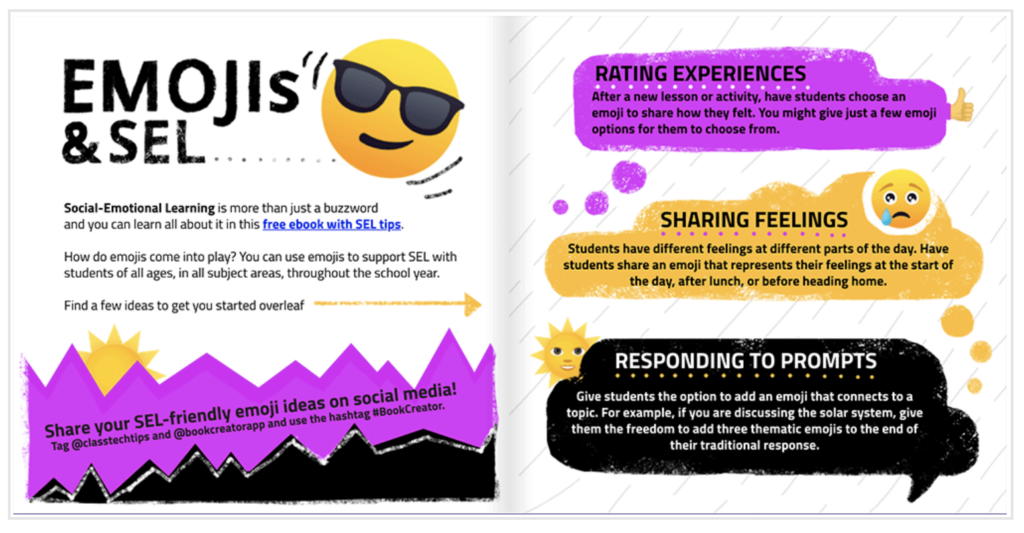
Sometimes a single symbol says it all, making emojis a fun and fast way to check for understanding. This post shares a popular free resource I created for Book Creator, and shows how emojis are a great option for quick check-ins or having students “rate” their confidence levels. It’s a simple strategy that provides an instant snapshot of your students’ progress during any lesson. Emojis might feel a little elementary but it’s a great option for students of all ages.
Simple Formative Assessment Strategies for Teachers
How do you currently check for understanding? I often ask this question when leading workshops on assessment strategies. This blog post explores a handful of strategies like how to use digital exit tickets and form-based observations, like Google Forms, to see patterns in student learning quickly.
How to Use Book Creator for Formative Assessment
I’m a huge fan of Book Creator because it allows students to “show what they know” in ways that go way deeper than a multiple-choice bubble. This post explains how students can use audio recordings, video reflections, and multimedia to explain their thinking. It connects to the “Assess” and “Create” essentials in my book EdTech Essentials and shares tips for giving students a space to produce their own knowledge.
Creativity and Student Creation
When students create with technology, they aren’t just consumers, they are authors, filmmakers, and designers. A frequent request for my professional learning sessions is how to support student creators and boost classroom creativity.
Creativity and Ethics in the Age of AI
This list is mostly full of educational technology blog posts with text at the center. But I’m including an episode of the Easy EdTech Podcast featured on the blog, too. Last year I spoke to fellow Apple Distinguished Educator Eric Walters about his work, and it ended up being a very popular episode. You can hear how high schoolers explore AI ethics and creativity through a special course Eric put together.
Prompts to Help Support Student Creativity
In this post, I’ve pulled together some ready-to-customize prompts. These can help you support a range of creative endeavors in your classroom. An AI chatbot can act as a thought partner to help you gather ideas that drive student creativity. Well-crafted prompts can lead to new lesson ideas and projects that you can use throughout the school year.
11 Classroom Brain Breaks to Keep Students Engaged
Creativity needs room to breathe, and this popular post offers quick ways to reset the energy in your room. It includes strategies like “Quick Draw” sketches, using AI-generated music, and thought-provoking prompts to keep students thinking during a break. These activities help create a more dynamic learning experience while improving overall concentration.

Productivity and Professional Learning
Finally, some of our most-read posts are those that help educators feel more organized and empowered in their role. Here are a few blog post to explore.
Tips for Having Coaching Conversations About AI with Educators
Over the past few years, I’ve worked with educators across the country to explore how AI can help them save time, enhance instructional strategies, and make the most of formative assessment data. In this post, I share a handful of favorite strategies you can use in your own professional learning environments. You’ll find three strategies and extra resources to explore.
12+ Quick Ways to Streamline Lesson Planning
We all want more time, and this post (and episode of the Easy EdTech Podcast) shares strategies and tools to help you get through your planning to do list a little faster. It focuses on reclaiming your day so you can dedicate more energy to your students. From using strategy cards to leveraging AI, these tips are designed to simplify your weekly workflow.
Simplifying Professional Development with On-Demand Tools
In my work with schools, I see a huge shift toward flexible, on-demand PD that supports educators when the need is real. This episode of the podcast went live earlier this month and discusses how to build professional learning ecosystems using resource repositories, webinars, and other timely tools. I think you’ll love this conversation with Naomi Church.
Which of these posts is your favorite? Or do you have another favorite educational technology blog post I should add? Send me a DM on Instagram or Twitter (X) @ClassTechTips—I’d love to hear from you!