Earlier this spring, I had the opportunity to work with a wonderful group of educators and families who were curious about all things AI. It was an evening full of questions, stories from home and school, and interest in how to explore artificial intelligence as a family.
We talked about a lot of different things at the event. AI privacy concerns came up right away, and we spent time digging into what it means to use AI inside and outside of school. There were plenty of highlights from the evening, but one thing that really stood out was the enthusiasm families had for exploring. They wanted to know: What can I actually do with AI right now?
One thing we looked at together was ways that families could use AI right away to model best practices for their children. I made a comparison that I often do, to how we model reading aloud to children in school and at home, and talk through our thought process when solving problems big and small.
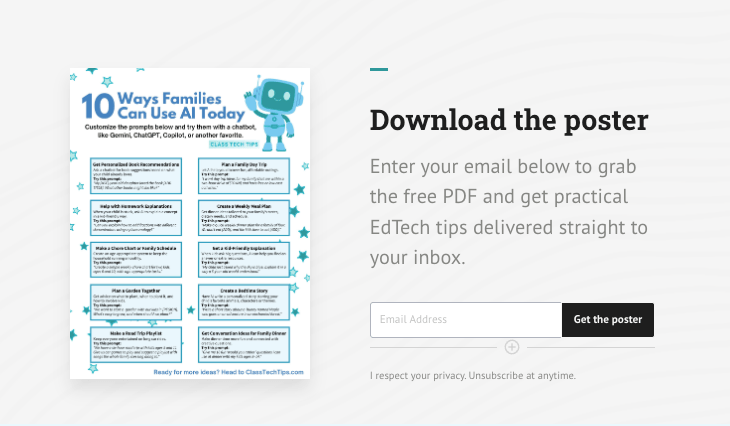
Today on the blog, I’ll share some tips you might want to try out, too. And a free download so you have an easy-to-reference PDF with AI prompts for families.
AI Prompts for Families with Examples
There are plenty of ways to get started with a new piece of technology, and when leading workshops and webinars, I like to start with some “low lift” strategies. As you’ll see on the list below, these ten AI prompts for families connect to some everyday experiences. There is a prompt for a simple idea and a quick example of the type of prompt you might use.
Whether you’re brand new to AI or you’ve been experimenting for a while, these prompts are designed to be easy entry points for families using AI at home. You can customize them and try them with a chatbot like Gemini, ChatGPT, Copilot, or another favorite AI tool.
1. Plan a Family Day Trip
Let AI help you discover fun, affordable outings near your home. Instead of spending time scrolling through search results, you can ask a chatbot to pull together day trip ideas tailored to your family’s interests and location. This is a great example of how AI for parents can save time and spark creativity.
Try this prompt:
“I want day trip ideas for my family that are within a two-hour drive of [TOWN] and have free or low-cost activities.”
2. Get Conversation Ideas for Family Dinner
Make dinner time more fun and connected with creative questions. An AI chatbot can generate conversation starters that are age-appropriate and get everyone at the table talking and laughing.
Try this prompt:
“Give me 10 fun ‘would you rather’ questions I can use at dinner with my kids ages 8–14.”
3. Get a Kid-Friendly Explanation
When kids ask big questions, AI can help you find an answer or extra resources. Whether it’s a science question or something about the world around them, a chatbot can break down complex ideas in language that makes sense for young learners. This is one of the best ways to use AI with kids by sitting together and exploring a topic in real time.
Try this prompt:
“My child just asked why the sky is blue. Explain it in a way a 6-year-old would understand.”
4. Create a Weekly Meal Plan
Get dinner ideas tailored to your family’s tastes, dietary needs, and schedule. This is one of those AI prompts that families love because it saves so much time during a busy week.
Try this prompt:
“Make a quick weekly dinner plan for a family of four. We don’t eat [ADD], and the kids love to eat [ADD].”
5. Create a Bedtime Story
Have AI write a personalized bedtime story starring your child’s favorite animals, characters, or themes. This is a wonderful way to use AI together with your child and let their imagination guide the experience.
Try this prompt:
“Write a short story about a bunny named Maple who goes on an adventure in an enchanted forest.”
6. Get Personalized Book Recommendations
Ask a chatbot for book suggestions based on what your child already loves. If your child just finished a book they couldn’t put down, AI can help you find the next great read. This is also a great prompt to try together as a family. Kids love seeing their reading interests reflected back to them.
Try this prompt:
“My [AGE]-year-old daughter loved the book [ADD TITLE]. What other books might she like?”
7. Make a Road Trip Playlist
Keep everyone entertained on long car rides with a little help from AI. A chatbot can put together a family-friendly playlist and even suggest car games that the whole family can enjoy together.
Try this prompt:
“We have a six-hour road trip with kids ages 5 and 11. Give us car games to play and suggest a playlist with songs the whole family can sing along to.”
8. Make a Chore Chart or Family Schedule
Create an age-appropriate system to keep the household running smoothly. AI can help you design a chore chart or family schedule that takes into account your children’s ages and abilities, and you can customize it as your family’s needs change.
Try this prompt:
“Create a simple weekly chore chart for two kids, ages 6 and 10, with age-appropriate tasks.”
9. Help with Homework Explanations
When your child is stuck on a homework problem, ask AI to explain a concept in a kid-friendly way. This isn’t about getting the answers — it’s about finding a new way to understand a tricky concept. You can sit with your child and explore the explanation together. If you’re an educator looking for more ideas on how AI can help with everyday tasks, take a look at 3 Time-Consuming Tasks AI Can Help Teachers Tackle.
Try this prompt:
“Can you explain how to add fractions with different denominators using a pizza analogy?”
10. Plan a Garden Together
Get advice on what to plant, when to plant it, and how to involve kids. Gardening is a fantastic hands-on activity for families, and AI can help you figure out what works best for your region and your family’s experience level.
Try this prompt:
“We want to start a garden with our kids in [REGION]. What’s easy to grow, and when should we plant?”
Getting Started with AI as a Family
Most of my work is around teacher use cases for artificial intelligence, everything from gathering ideas for an upcoming lesson to finding the “right” AI-powered tools. It was lots of fun working with this group of educators and families to share what is happening in the world of AI in education, and share some practical strategies they can use right away.
Remember, the AI prompts above are just starting points. You can customize each one to make the results even more useful. The brackets in each prompt are there to remind you to add helpful information. The more specific you are, the better the results will be. For even more ideas to try, check out my AI resources page.
If you’re interested in bringing a conversation like this to your school community, I’d love to hear from you. If you want to book a webinar or a workshop for your school or district, reach out! You can learn more about my work with schools and districts on this page. I love visiting places and working in person with groups of educators and families. Whether it’s an in-person evening event or a virtual session, these conversations about AI for families are so important!