Have you ever wished you could take students on a field trip that just wasn’t really feasible? Earlier this summer, I presented on AI virtual field trips at the ISTE Live + ASCD Annual Conference in Orlando. If you have been reading this blog for a while, you know how much I love finding and sharing high quality resources you can use right away.
A virtual field trip, even one powered by artificial intelligence, can help connect students to different parts of the world. It can spark conversations about class content, help students build AI literacy skills, and encourage students to make connections to their own lives.
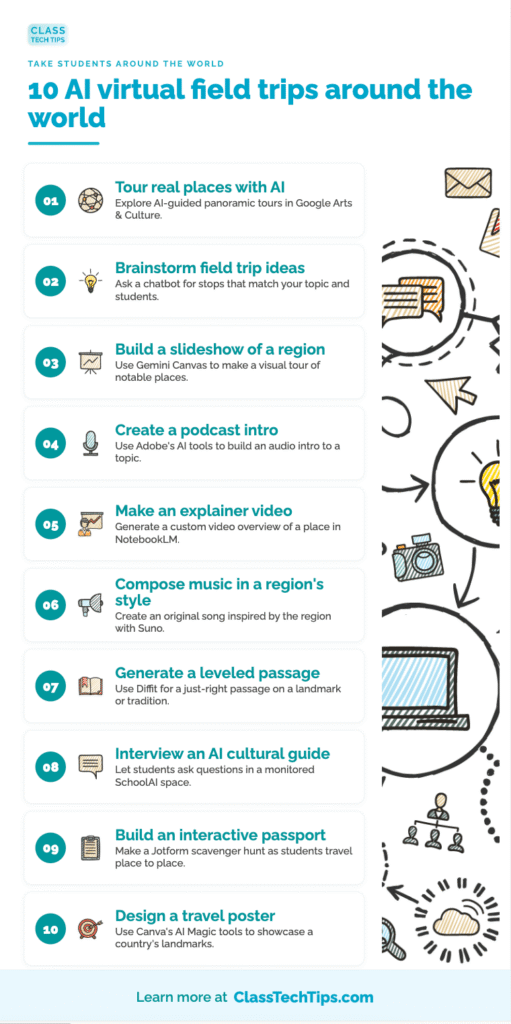
Although I go into a lot more detail when running this session live, I thought it would be fun to share a quick recap right here on the blog, with some of the highlights and a few favorites. Today I have ten ideas for AI virtual field trips and global learning experiences, each with a spotlight tool and some sample prompts you can try.
Explore: AI Virtual Field Trips
This session grew out of the Explore essential, one of the twelve essentials in my book EdTech Essentials. The Explore chapter is all about bringing the world into your classroom, and it has always been one of my favorite topics to dig into with educators. Often when hosting a webinar series around the book, this is one of the essentials we dive into right away.
It connects to lots of classroom experiences and content areas. In a math classroom, you might want students to explore a spot known for displaying tessellations (think the Pyramid at The Louvre). In a science classroom, you might head to the Grand Canyon to talk about layers of rocks. There are lots of ways a quick virtual field trip can breathe life into a lesson.
As AI tools made it easier than ever to build tours, travel projects, and global learning experiences, I kept adding ideas to my list. Taking students around the world with AI does not require a big budget or a passport. A few free and low-cost tools, combined with an intentional learning goal, can have a big impact.
10 Favorites from My AI Virtual Field Trips Session
Whether you teach geography, history, world languages, or you just want to add a global spark to your reading, these strategies offer entry points. Pick one for your next unit, then build from there.
1. Take Students on AI-Generated Tours of Real Places
Start by going somewhere together. Talking Tours in Google Arts & Culture offers AI-guided tours of real places that students can explore and ask questions about. It’s a guided visit that uses AI-generated content combined with an interactive panoramic view. As students move through a space they are able to pause and ask questions. This is a resource that could offer inspiration for a student project, too.
2. Brainstorm Ideas for Virtual Field Trips
Sometimes the hardest part is deciding where to go. A chatbot like ChatGPT is perfect for gathering ideas and stops for a virtual field trip that matches your topic and your students’ interests.
Try this prompt: “Plan a virtual field trip through ancient Egypt for 6th graders, with five stops and one activity for each.”
3. Create a Slideshow of Notable Places in a Region
A quick visual tour helps students picture where a story or event takes place. Gemini’s Canvas tool builds editable slideshows, docs, and visuals right inside Gemini. So you can create a slideshow of notable places in minutes. During my session, I shared a slide deck I created showcasing visuals from Colonial Williamsburg.
Try this prompt: “Create a slideshow introducing five notable landmarks in [COUNTRY], with one interesting fact about each for middle schoolers.”
4. Create a Podcast to Introduce a Region’s Topic
Audio is a great way to set the stage before students dig in. Adobe’s AI study tools can summarize documents and generate questions. They can help you build an audio introduction to a topic from the part of the world you are studying.
5. Make an Explainer Video About a Place
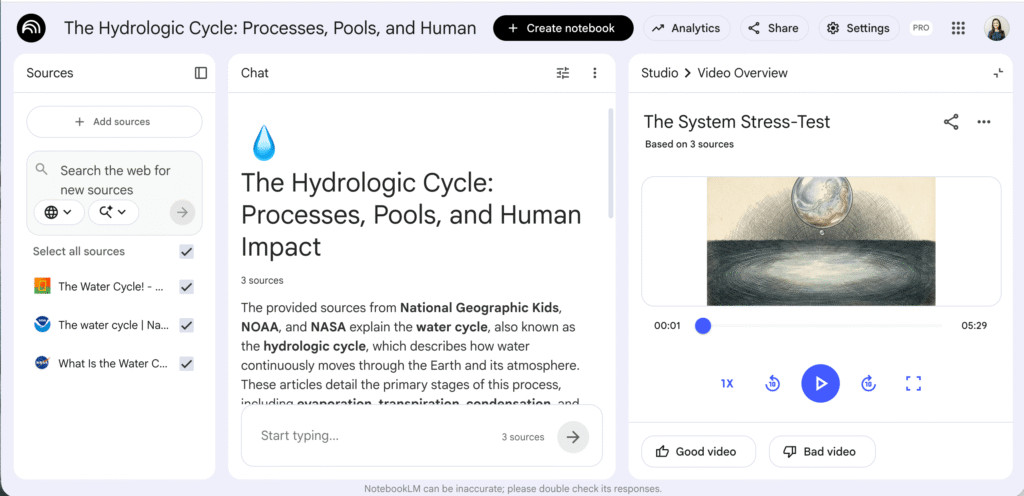
Bring a destination to life with a short video. Upload your materials to NotebookLM and generate summaries, a study guide, and audio or video overviews. This is perfect for a quick explainer about a place you are studying.
In the Studio section tap the arrow next to the Video option to create a custom video. You’ll see a few options to choose from and the ability to add a prompt to specify your focus area.
6. Compose Music in the Style of a Region
Suno turns lyrics and a style prompt into a finished, original song, so you can create a piece inspired by the music of the region you are exploring. Students can research what instruments and styles of music are popular in a region, and use this information to critique a piece of music you create with the help of AI.
7. Generate a Leveled Passage on a Landmark or Tradition
Do you want to incorporate a reading experience into your next lesson? Diffit generates leveled reading passages, summaries, and graphic organizers in seconds, so you can hand every student a just-right passage about a landmark, tradition, or historical event. It’s also great addition to a Talking Tours exploration, too. I recently created a set of remixable lessons for Diffit, you can check them out here.
Try this prompt: “Write a leveled passage about the Great Wall of China at a 4th grade and 6th grade level, with three comprehension questions.”
8. Have Students Interview an AI Cultural Guide
Give students a chance to ask their own questions in a safe, teacher-monitored space. SchoolAI lets you build self-paced AI “Spaces” with a live teacher dashboard. Students can interview an AI cultural guide while you keep an eye on the conversation.

9. Create an Interactive Passport or Scavenger Hunt
Turn exploration into a game. Jotform is a form builder with AI Agents you can train on your own materials. This makes it possible to build an interactive passport or scavenger hunt students complete as they travel from place to place. You can also make a form where students submit fun facts from their research and virtual travels.
10. Design a Travel Poster or Postcard
Let students show what they have learned with a creative project. Canva’s AI Magic tools generate images, text, and designs in seconds, so students can design a travel poster featuring a country’s landmarks, food, and traditions. With Adobe Express inside of Book Creator, they can even publish a postcard that pairs AI images with their own writing.
Getting Started with AI Virtual Field Trips
Remember, the strategies, tools, and prompts above are just starting points. The more you add about your grade level, your subject, and the specific place you are exploring, the more useful the results will be. Try one idea with your next unit and let students help guide where you go.
If you would love to bring a workshop like this to your school or district, please don’t hesitate to reach out. You can learn more about my workshops and webinars here. Whether it is in person or virtual, I love working alongside educators to make AI feel approachable and genuinely useful.
Want more ideas like these delivered to your inbox? Every Monday I send out a free newsletter packed with EdTech tips and ready-to-use resources for educators. Sign up here so you do not miss a thing, and visit my AI resources page for even more strategies to explore!